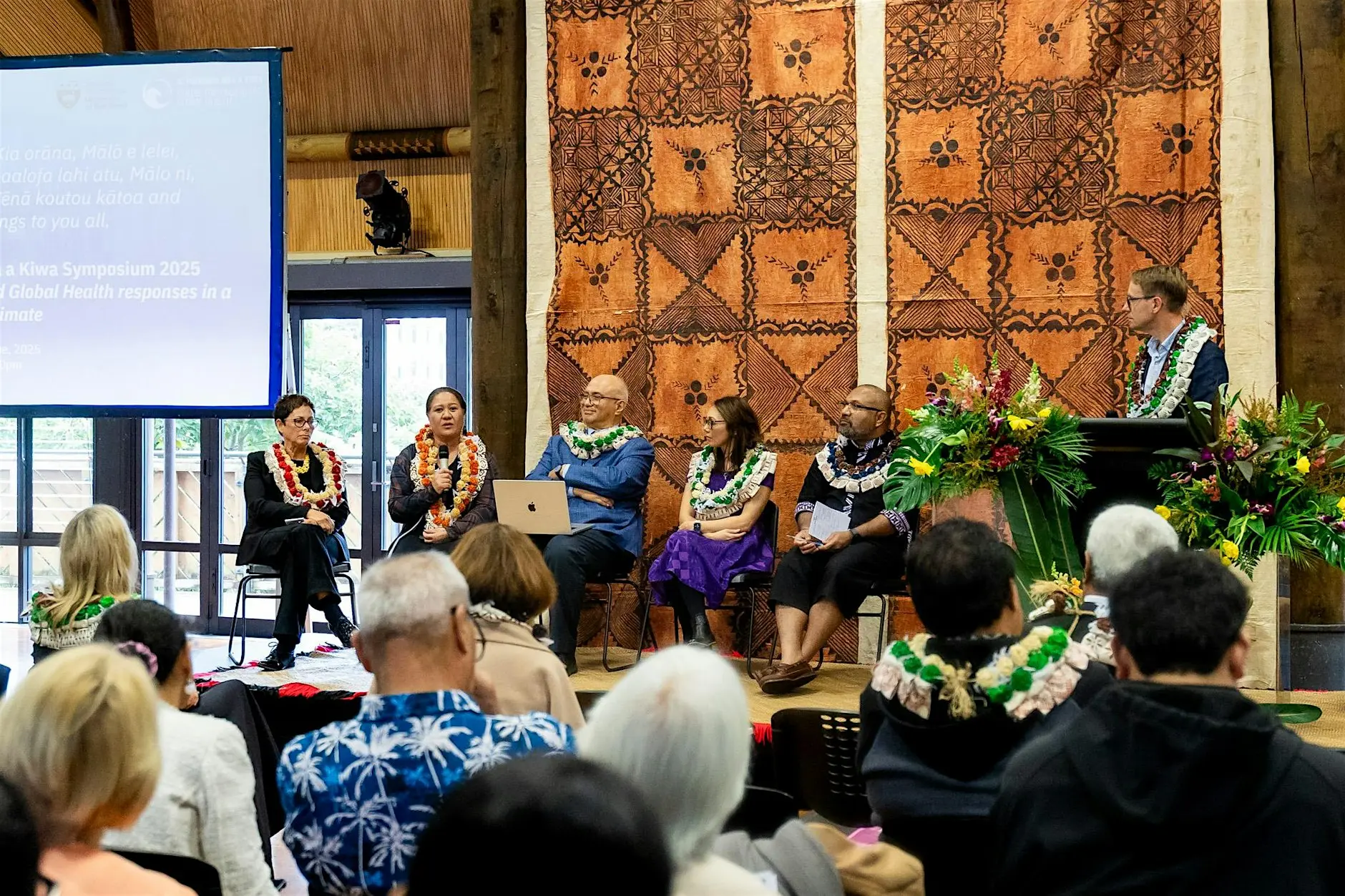
Audience gathered at a Pacific Futures event
Participants gathered in a talanoa fale
Registration open

He Pito Mata Meeting with the Royal Society Te Apārangi

He Pito Mata brings together early-career Māori and Pacific researchers with fellows of the Royal Society Te Apārangi for two days of shared work. The meeting is built around a simple premise: the people shaping the next generation of Pacific research should be in the same room as the people who can open doors for them, and there should be enough time for those conversations to go somewhere.

Mornings are given to plenary sessions where senior researchers set out how funding, publication and institutional pathways actually work in Aotearoa and across the region. Afternoons move into small groups, where participants workshop their own projects with a mentor and a handful of peers working on adjacent questions.

The meeting closes with a session on what participants need from the Academy over the coming year. What is said there feeds directly into our mentoring programme and our submissions to research funders, so the room shapes the work that follows it.

There is no cost to attend. Travel support is available for participants coming from outside Wellington, and we ask that you indicate this when registering so we can plan accordingly.

Symposium

2–3 Sept 2026
2–3 Sept 2026
2–3 Sept 2026

Wellington, NZ

+

Online

Upcoming & PAST

All events

All

In person

Online

Young Pacific researchers seated in a circle in talanoa inside a traditional open-sided fale

Conference

27 Sept – 30 Dec 2026

How to create and write PAS and PF event titles.

Always duplicate this record to start a new event. Do not use the + button in the item list — it fills in Categories and both dates on its own, including the End Date, which quietly becomes a one-day event unless you change it. Duplicating this record keeps every field honest: filled in where an example helps, and empty where a real decision is needed.

Give the event one clear sentence as a title, with no full stop, at around 55 characters. Longer titles cut off on the card and in the list. Say what the event actually is rather than that it is an event: “Open science in the Pacific: a practical clinic” works, “PAS Event 2026” does not.

Write this section the way you would describe the event to someone deciding whether to come. The first two lines become the summary on the events index, so lead with what it is and who it is for, then add the detail underneath. Around 155 characters is a good length for those opening lines.

Enter times in Start Time and End Time using the 24-hour clock, with the Timezone beside them. The page joins them up for you, so never type a dash yourself. Leave End Time blank if the finish is not fixed.

Programme and Speakers are optional. Leave either one empty and its whole section disappears from the page, so there is no need to invent content to fill a gap. Location is only for events people physically attend, and it hides itself for anything online.

You do not usually set the status. The event dates, Registration Opens and Registration Closes decide whether the page reads Registration open, Opens 14 Sept, Registration closed or Completed, and whether the Register button is live. Leave Registration Opens blank if registration is already open, and Registration Closes blank if there is no cut-off. Postponed and Cancelled are set by hand, under Special Status. So is Save the date, for when the date is locked in but the programme or speakers are not ready yet — the page keeps showing the real date, with a Save the date badge alongside it. Framer will not let Start Date be left empty, so if the date itself is not confirmed, pick your best guess and set Special Status to Date TBC instead — the page will show Date TBC in its place and the Register button will not go live until you change it.

Wellinton, New Zealand

+ Online

Opens 27 Aug
View event
Audience in a conference session

Conference

27 Sept – 30 Dec 2026

How to create and write PAS and PF event titles.

Always duplicate this record to start a new event. Do not use the + button in the item list — it fills in Categories and both dates on its own, including the End Date, which quietly becomes a one-day event unless you change it. Duplicating this record keeps every field honest: filled in where an example helps, and empty where a real decision is needed.

Give the event one clear sentence as a title, with no full stop, at around 55 characters. Longer titles cut off on the card and in the list. Say what the event actually is rather than that it is an event: “Open science in the Pacific: a practical clinic” works, “PAS Event 2026” does not.

Write this section the way you would describe the event to someone deciding whether to come. The first two lines become the summary on the events index, so lead with what it is and who it is for, then add the detail underneath. Around 155 characters is a good length for those opening lines.

Enter times in Start Time and End Time using the 24-hour clock, with the Timezone beside them. The page joins them up for you, so never type a dash yourself. Leave End Time blank if the finish is not fixed.

Programme and Speakers are optional. Leave either one empty and its whole section disappears from the page, so there is no need to invent content to fill a gap. Location is only for events people physically attend, and it hides itself for anything online.

You do not usually set the status. The event dates, Registration Opens and Registration Closes decide whether the page reads Registration open, Opens 14 Sept, Registration closed or Completed, and whether the Register button is live. Leave Registration Opens blank if registration is already open, and Registration Closes blank if there is no cut-off. Postponed and Cancelled are set by hand, under Special Status. So is Save the date, for when the date is locked in but the programme or speakers are not ready yet — the page keeps showing the real date, with a Save the date badge alongside it. Framer will not let Start Date be left empty, so if the date itself is not confirmed, pick your best guess and set Special Status to Date TBC instead — the page will show Date TBC in its place and the Register button will not go live until you change it.

Wellinton, New Zealand

+ Online

Opens 27 Aug
View event
Young Pacific researchers seated in a circle in talanoa inside a traditional open-sided fale

Conference

27 Sept – 30 Dec 2026

How to create and write PAS and PF event titles.

Always duplicate this record to start a new event. Do not use the + button in the item list — it fills in Categories and both dates on its own, including the End Date, which quietly becomes a one-day event unless you change it. Duplicating this record keeps every field honest: filled in where an example helps, and empty where a real decision is needed.

Give the event one clear sentence as a title, with no full stop, at around 55 characters. Longer titles cut off on the card and in the list. Say what the event actually is rather than that it is an event: “Open science in the Pacific: a practical clinic” works, “PAS Event 2026” does not.

Write this section the way you would describe the event to someone deciding whether to come. The first two lines become the summary on the events index, so lead with what it is and who it is for, then add the detail underneath. Around 155 characters is a good length for those opening lines.

Enter times in Start Time and End Time using the 24-hour clock, with the Timezone beside them. The page joins them up for you, so never type a dash yourself. Leave End Time blank if the finish is not fixed.

Programme and Speakers are optional. Leave either one empty and its whole section disappears from the page, so there is no need to invent content to fill a gap. Location is only for events people physically attend, and it hides itself for anything online.

You do not usually set the status. The event dates, Registration Opens and Registration Closes decide whether the page reads Registration open, Opens 14 Sept, Registration closed or Completed, and whether the Register button is live. Leave Registration Opens blank if registration is already open, and Registration Closes blank if there is no cut-off. Postponed and Cancelled are set by hand, under Special Status. So is Save the date, for when the date is locked in but the programme or speakers are not ready yet — the page keeps showing the real date, with a Save the date badge alongside it. Framer will not let Start Date be left empty, so if the date itself is not confirmed, pick your best guess and set Special Status to Date TBC instead — the page will show Date TBC in its place and the Register button will not go live until you change it.

Wellinton, New Zealand

+ Online

Opens 27 Aug
View event
Audience in a conference session

How to create and write PAS and PF event titles.

Always duplicate this record to start a new event. Do not use the + button in the item list — it fills in Categories and both dates on its own, including the End Date, which quietly becomes a one-day event unless you change it. Duplicating this record keeps every field honest: filled in where an example helps, and empty where a real decision is needed.

Give the event one clear sentence as a title, with no full stop, at around 55 characters. Longer titles cut off on the card and in the list. Say what the event actually is rather than that it is an event: “Open science in the Pacific: a practical clinic” works, “PAS Event 2026” does not.

Write this section the way you would describe the event to someone deciding whether to come. The first two lines become the summary on the events index, so lead with what it is and who it is for, then add the detail underneath. Around 155 characters is a good length for those opening lines.

Enter times in Start Time and End Time using the 24-hour clock, with the Timezone beside them. The page joins them up for you, so never type a dash yourself. Leave End Time blank if the finish is not fixed.

Programme and Speakers are optional. Leave either one empty and its whole section disappears from the page, so there is no need to invent content to fill a gap. Location is only for events people physically attend, and it hides itself for anything online.

You do not usually set the status. The event dates, Registration Opens and Registration Closes decide whether the page reads Registration open, Opens 14 Sept, Registration closed or Completed, and whether the Register button is live. Leave Registration Opens blank if registration is already open, and Registration Closes blank if there is no cut-off. Postponed and Cancelled are set by hand, under Special Status. So is Save the date, for when the date is locked in but the programme or speakers are not ready yet — the page keeps showing the real date, with a Save the date badge alongside it. Framer will not let Start Date be left empty, so if the date itself is not confirmed, pick your best guess and set Special Status to Date TBC instead — the page will show Date TBC in its place and the Register button will not go live until you change it.

Conference

·

27 Sept – 30 Dec 2026

·

Wellinton, New Zealand

+ Online

Opens 27 Aug
View event
Audience in a conference session

How to create and write PAS and PF event titles.

Always duplicate this record to start a new event. Do not use the + button in the item list — it fills in Categories and both dates on its own, including the End Date, which quietly becomes a one-day event unless you change it. Duplicating this record keeps every field honest: filled in where an example helps, and empty where a real decision is needed.

Give the event one clear sentence as a title, with no full stop, at around 55 characters. Longer titles cut off on the card and in the list. Say what the event actually is rather than that it is an event: “Open science in the Pacific: a practical clinic” works, “PAS Event 2026” does not.

Write this section the way you would describe the event to someone deciding whether to come. The first two lines become the summary on the events index, so lead with what it is and who it is for, then add the detail underneath. Around 155 characters is a good length for those opening lines.

Enter times in Start Time and End Time using the 24-hour clock, with the Timezone beside them. The page joins them up for you, so never type a dash yourself. Leave End Time blank if the finish is not fixed.

Programme and Speakers are optional. Leave either one empty and its whole section disappears from the page, so there is no need to invent content to fill a gap. Location is only for events people physically attend, and it hides itself for anything online.

You do not usually set the status. The event dates, Registration Opens and Registration Closes decide whether the page reads Registration open, Opens 14 Sept, Registration closed or Completed, and whether the Register button is live. Leave Registration Opens blank if registration is already open, and Registration Closes blank if there is no cut-off. Postponed and Cancelled are set by hand, under Special Status. So is Save the date, for when the date is locked in but the programme or speakers are not ready yet — the page keeps showing the real date, with a Save the date badge alongside it. Framer will not let Start Date be left empty, so if the date itself is not confirmed, pick your best guess and set Special Status to Date TBC instead — the page will show Date TBC in its place and the Register button will not go live until you change it.

Conference

·

27 Sept – 30 Dec 2026

·

Wellinton, New Zealand

+ Online

Opens 27 Aug
View event

Host with us

Hosting something for Pacific researchers?

If your gathering belongs in front of the Pacific Futures community, tell us about it.